Instagram Direct Messages (DMs) allow users to chat privately, but the app automatically shows a Seen status once you open a message. Unfortunately, Instagram does not provide an official option to disable read receipts, unlike WhatsApp or Facebook Messenger.
There are a few legitimate workarounds that allow you to read Instagram messages without being seen. Here is a detailed guide for both Android and iPhone users.
Why Instagram Shows “Seen” on Messages
Instagram displays a “Seen” status to improve communication transparency. Once you open a chat thread while connected to the internet, the sender will see that you have read the message.
Since there is no official toggle to disable this feature, users rely on temporary workarounds.
Method 1: Read Instagram Messages by Turning Off Internet
This is the most common trick and works on both Android and iPhone.
- Do not tap the Instagram notification.
- Open the Instagram app and go to the DM inbox, but do not open the chat yet.
- Force close the Instagram app completely.
- Turn off Wi-Fi and mobile data.
- Reopen Instagram and open the chat to read the message.
- Close the app before reconnecting to the internet.
Important: Once you reconnect to the internet, the message may be marked as seen if the chat stays open.
Method 2: Read Instagram Messages Without Being Seen Using Restrict
Instagram’s Restrict feature can help you read messages without triggering read receipts.
- Open the person’s Instagram profile.
- Tap the three-dot menu in the top-right corner.
- Select Restrict.
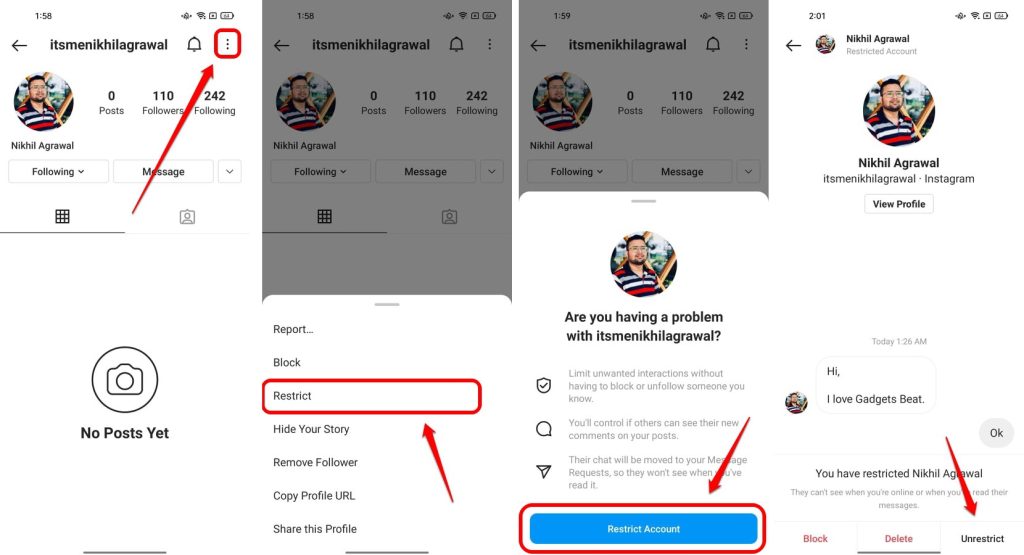
Once restricted, their messages move to Message Requests, which do not show “Seen” status until you accept the request.
Note: You cannot view media (photos/videos) sent in restricted mode.
Method 3: Disable Internet and Log Out (More Reliable)
This method prevents Instagram from syncing the read status.
- Turn off Wi-Fi and mobile data.
- Open Instagram and read the message.
- Go to Settings > Log Out (while still offline).
- Turn the internet back on and log in again.
Since the app logged out offline, the read status will not sync.
Method 4: Read Instagram Messages from Notifications
If message previews are enabled, you can read part of the message from the notification bar without opening the app.
- Enable Message Preview in phone notification settings.
- Avoid tapping the notification or opening the chat thread.
This method is limited but works for short messages.
Can third-party apps read Instagram messages without being seen?
Some third-party tools assert their ability to read Instagram direct messages without being visible. However:
- They may violate Instagram’s terms of service
- They can compromise account security and privacy
- They may lead to account suspension or data leaks
Recommendation: Avoid using unofficial monitoring or automation tools for privacy and security reasons.
Can You Turn Off Read Receipts on Instagram?
No. Instagram does not offer an official option to disable read receipts. Any claim suggesting otherwise is inaccurate.
Final Thoughts
Reading Instagram messages without being seen is possible using offline tricks, restrict mode, or logout methods. However, these are temporary workarounds and not official features. For privacy and security, avoid third-party apps that require login access.